
Serving public files sounds simple until the application grows around it.
At the beginning, it is tempting to put files in an S3 bucket, make them public, and move on. The asset has a URL. The browser can load it. The ticket is closed.
But that decision usually ages poorly.
Eventually you want more control. You want a stable URL shape. You want the bucket name hidden. You want caching at the edge. You want access logs, WAF rules, Terraform-managed environments, and a way to route file delivery through the same public boundary as the rest of the platform.
That is when "just make the bucket public" stops feeling like an architecture and starts feeling like a shortcut.
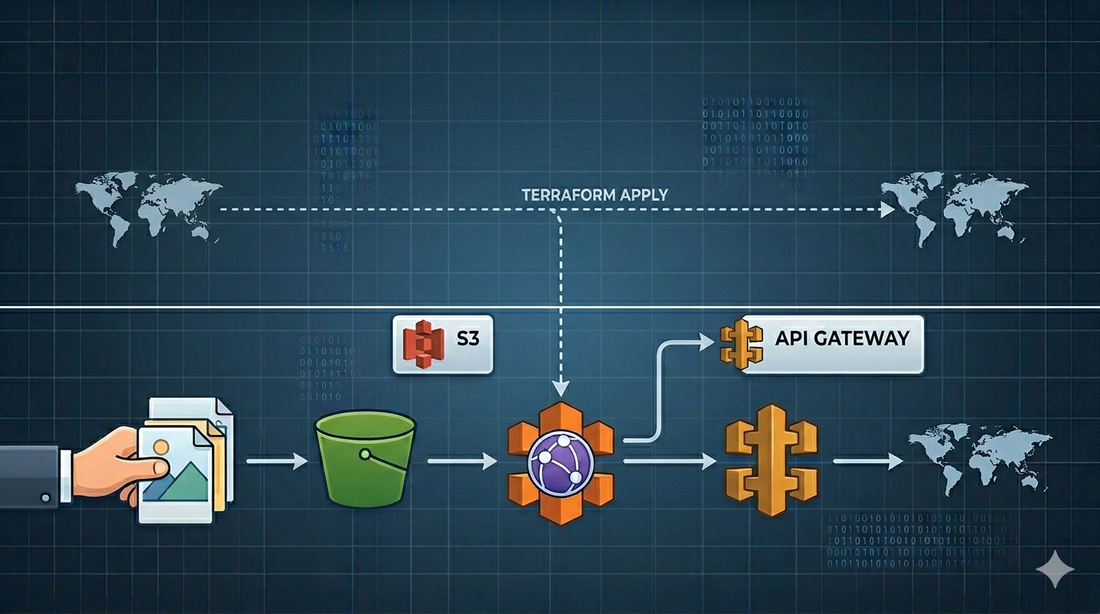
In one production system I worked on, the shape we needed was closer to this:
Client
  -> CloudFront
  -> API Gateway
  -> S3
The files were public from a product perspective, but the S3 bucket itself was not the public API.
That distinction matters.
The goal
The goal was not just to upload files to S3.
The goal was to build a repeatable asset delivery path with a few constraints:
- keep the S3 bucket private
- expose public files through a stable HTTP path
- let API Gateway read objects from S3 through an IAM role
- put CloudFront in front for caching, TLS, WAF, and edge delivery
- provision the whole shape with Terraform
- reuse the same module across environments
The public contract could then look like:
GET /storage/profile-images/user-123/avatar.png
GET /storage/documents/sample.pdf
Internally, API Gateway maps that request to an S3 object key. The client does not need to know the bucket name, the AWS region, or the storage layout.
That is a cleaner boundary.
Why not just use public S3 URLs?
There are cases where public S3 URLs are fine. A small internal tool. A prototype. A throwaway demo. A bucket with low-risk static assets and no need for a custom delivery path.
But in a product system, I usually want to avoid making the bucket the public interface.
There are a few reasons.
First, S3 bucket URLs expose implementation details. If you later need to move assets, rename buckets, split storage by environment, introduce a CDN, or change access rules, clients may already depend on the old URL shape.
Second, public buckets make security review harder. AWS has made S3 Block Public Access the safer default for a reason. If files need to be public, I would rather expose them deliberately through CloudFront or API Gateway than rely on object ACLs scattered across uploads.
Third, a bucket is not an application boundary. It is storage. The public boundary should be where you can apply routing, caching, observability, WAF rules, headers, and domain decisions.
That does not mean every asset request must go through API Gateway. For many systems, CloudFront directly in front of a private S3 bucket with Origin Access Control is the simpler and better architecture.
But if you already have an API Gateway boundary and want asset URLs to live under that API, an S3 service integration can be a practical fit.
The architecture
The version I like looks like this:
Browser or client
  -> CloudFront distribution
  -> API Gateway REST API
  -> AWS service integration
  -> S3 bucket
CloudFront gives the application an edge-optimized public entry point. API Gateway owns the route, such as /storage/{file+}. S3 remains the storage layer.
The key part is that API Gateway reads from S3 using an execution role:
API Gateway assumes IAM role
  -> role allows s3:GetObject on selected bucket/prefix
  -> API Gateway returns the object response to the client
That gives you a narrow permission model. The bucket does not need to be public. API Gateway needs only the permissions required to read the objects it serves.
The S3 module
The S3 module should start boring.
That is a compliment.
resource "aws_s3_bucket" "assets" {
  bucket        = var.bucket_name
  force_destroy = false
  tags          = var.tags
}

resource "aws_s3_bucket_versioning" "assets" {
  bucket = aws_s3_bucket.assets.id

  versioning_configuration {
    status = "Enabled"
  }
}

resource "aws_s3_bucket_public_access_block" "assets" {
  bucket = aws_s3_bucket.assets.id

  block_public_acls       = true
  block_public_policy     = true
  ignore_public_acls      = true
  restrict_public_buckets = true
}
The important decision is to keep the bucket private by default.
I would also be careful with force_destroy. It is convenient in development, but dangerous in production. A reusable module can expose it as a variable, but the production default should be conservative:
variable "force_destroy" {
  type        = bool
  description = "Allow Terraform to delete the bucket even when it contains objects."
  default     = false
}
For outputs, expose the bucket name, ARN, and regional domain name:
output "bucket_name" {
  value = aws_s3_bucket.assets.id
}

output "bucket_arn" {
  value = aws_s3_bucket.assets.arn
}

output "bucket_domain_name" {
  value = aws_s3_bucket.assets.bucket_domain_name
}
Do not expose more than callers need. The cleaner the module contract, the easier it is to reuse safely.
The IAM role for API Gateway
API Gateway needs a role it can assume when calling S3.
The trust policy is simple:
data "aws_iam_policy_document" "api_gateway_assume_role" {
  statement {
    effect = "Allow"

    principals {
      type        = "Service"
      identifiers = ["apigateway.amazonaws.com"]
    }

    actions = ["sts:AssumeRole"]
  }
}

resource "aws_iam_role" "api_gateway_s3" {
  name               = "${var.name_prefix}-api-gateway-s3"
  assume_role_policy = data.aws_iam_policy_document.api_gateway_assume_role.json
}
Then grant the smallest useful S3 permission:
data "aws_iam_policy_document" "api_gateway_s3_read" {
  statement {
    effect = "Allow"

    actions = [
      "s3:GetObject"
    ]

    resources = [
      "${var.assets_bucket_arn}/*"
    ]
  }
}

resource "aws_iam_role_policy" "api_gateway_s3_read" {
  role   = aws_iam_role.api_gateway_s3.id
  policy = data.aws_iam_policy_document.api_gateway_s3_read.json
}
In real systems, I prefer restricting this further by prefix if the route only serves a subset of the bucket:
resources = [
  "${var.assets_bucket_arn}/public/*"
]
That one line can be the difference between "API Gateway can read public assets" and "API Gateway can read everything in the bucket."
Those are not the same permission.
API Gateway as an S3 service proxy
The API Gateway piece is where the pattern becomes useful.
Create a stable route:
resource "aws_api_gateway_resource" "storage" {
  rest_api_id = var.rest_api_id
  parent_id   = var.root_resource_id
  path_part   = "storage"
}

resource "aws_api_gateway_resource" "file" {
  rest_api_id = var.rest_api_id
  parent_id   = aws_api_gateway_resource.storage.id
  path_part   = "{file+}"
}
The {file+} path parameter is a greedy path. It allows a request like:
/storage/images/users/123/avatar.png
to map the full nested key:
images/users/123/avatar.png
Then define the GET method:
resource "aws_api_gateway_method" "get_file" {
  rest_api_id   = var.rest_api_id
  resource_id   = aws_api_gateway_resource.file.id
  http_method   = "GET"
  authorization = "NONE"

  request_parameters = {
    "method.request.path.file" = true
  }
}
And wire it to S3:
resource "aws_api_gateway_integration" "s3_get_object" {
  rest_api_id             = var.rest_api_id
  resource_id             = aws_api_gateway_resource.file.id
  http_method             = aws_api_gateway_method.get_file.http_method
  type                    = "AWS"
  integration_http_method = "GET"
  uri                     = "arn:aws:apigateway:${var.aws_region}:s3:path/${var.bucket_name}/{file}"
  credentials             = var.api_gateway_s3_role_arn

  request_parameters = {
    "integration.request.path.file" = "method.request.path.file"
  }
}
This is the core trick.
API Gateway receives a URL path. Terraform maps that path into an S3 object key. The IAM role gives API Gateway the right to fetch the object. The bucket stays private.
For responses, make sure you pass useful headers through:
resource "aws_api_gateway_method_response" "ok" {
  rest_api_id = var.rest_api_id
  resource_id = aws_api_gateway_resource.file.id
  http_method = aws_api_gateway_method.get_file.http_method
  status_code = "200"

  response_parameters = {
    "method.response.header.Access-Control-Allow-Origin" = true
    "method.response.header.Content-Type"                = true
  }
}

resource "aws_api_gateway_integration_response" "ok" {
  rest_api_id = var.rest_api_id
  resource_id = aws_api_gateway_resource.file.id
  http_method = aws_api_gateway_method.get_file.http_method
  status_code = aws_api_gateway_method_response.ok.status_code

  response_parameters = {
    "method.response.header.Access-Control-Allow-Origin" = "'*'"
    "method.response.header.Content-Type"                = "integration.response.header.Content-Type"
  }
}
This is also where you should slow down and think about binary files.
Images, PDFs, audio, and other non-JSON assets may require API Gateway binary media type configuration and careful Content-Type metadata on S3 objects. If this route is going to serve real user-facing files, test with the actual file types, not only with a text file.
CloudFront in front
CloudFront can sit in front of the API Gateway domain:
resource "aws_cloudfront_distribution" "assets" {
  origin {
    domain_name = var.api_gateway_domain_name
    origin_id   = "api-gateway-assets-origin"

    custom_origin_config {
      http_port              = 80
      https_port             = 443
      origin_protocol_policy = "https-only"
      origin_ssl_protocols   = ["TLSv1.2"]
    }
  }

  enabled         = true
  is_ipv6_enabled = true
  web_acl_id      = var.web_acl_id

  default_cache_behavior {
    target_origin_id       = "api-gateway-assets-origin"
    viewer_protocol_policy = "redirect-to-https"

    allowed_methods = ["GET", "HEAD", "OPTIONS"]
    cached_methods  = ["GET", "HEAD"]
  }

  restrictions {
    geo_restriction {
      restriction_type = "none"
    }
  }

  viewer_certificate {
    cloudfront_default_certificate = true
  }
}
The example above is intentionally simplified.
In production, I would normally use a custom domain and ACM certificate, tune cache policies, decide which headers and query strings matter, and attach WAF rules if the endpoint is internet-facing.
One detail worth calling out: if CloudFront points directly to S3, use Origin Access Control. That is the modern AWS-recommended path for restricting S3 origins to CloudFront. In the API Gateway pattern, CloudFront is pointing to API Gateway as a custom origin, and API Gateway is the service allowed to read from S3.
Those are different designs.
Do not blur them together.
Terraform module boundaries
The temptation with Terraform is to build one giant module called assets_delivery and hide everything inside it.
Sometimes that is fine.
But in a larger system, I prefer smaller modules with clear contracts:
modules/s3
modules/iam-role
modules/apigateway-s3-route
modules/cloudfront
Then the environment layer composes them:
module "assets_bucket" {
  source      = "../modules/s3"
  bucket_name = "${var.environment_name}-assets"
  tags        = local.tags
}

module "api_gateway_s3_route" {
  source                  = "../modules/apigateway-s3-route"
  rest_api_id             = module.api.rest_api_id
  root_resource_id        = module.api.root_resource_id
  bucket_name             = module.assets_bucket.bucket_name
  api_gateway_s3_role_arn = module.api_gateway_s3_role.role_arn
  aws_region              = var.aws_region
}
This keeps ownership clear. The S3 module should not need to know everything about API Gateway. The API Gateway route module should not need to create the whole bucket. The CloudFront module should not need to understand every application route.
Good Terraform module design is mostly about resisting unnecessary intimacy between resources.
What I would watch carefully
There are a few sharp edges in this architecture.
The first is caching.
If the files are immutable, use content-hashed keys and cache aggressively. If the files can change under the same key, be more careful. CloudFront invalidations work, but they should not become your normal publishing workflow for high-volume changes.
The second is authorization.
This article is about public assets. If the files are private per user, do not use this exact pattern as-is. Use signed URLs, signed cookies, application-level authorization, or a dedicated download flow.
The third is binary handling.
API Gateway can serve binary content, but you need to configure it deliberately. Test with the actual file types your product uses.
The fourth is least privilege.
The API Gateway execution role should read only the bucket or prefix it needs. Avoid giving it broad S3 access just because the first demo works faster that way.
The fifth is the route contract.
Once clients start using /storage/{file+}, changing that path becomes a product migration. Treat the URL shape as an API, not as incidental infrastructure.
Closing thought
Public asset delivery is one of those areas where the simplest version works until it becomes part of the product.
At that point, the question changes.
It is no longer:
How do I make this file reachable?
It becomes:
What public contract do I want around file delivery, and how much of my storage layer should clients be allowed to see?
For small systems, public S3 may be enough.
For mature systems, I prefer a clearer boundary: private storage, explicit routing, narrow IAM permissions, edge caching, and Terraform-managed infrastructure that can be reproduced across environments.
That design is a little more work upfront.
But it gives the next engineer something much better than a bucket full of public objects and a hope that nobody depends on the wrong URL.
Discussion